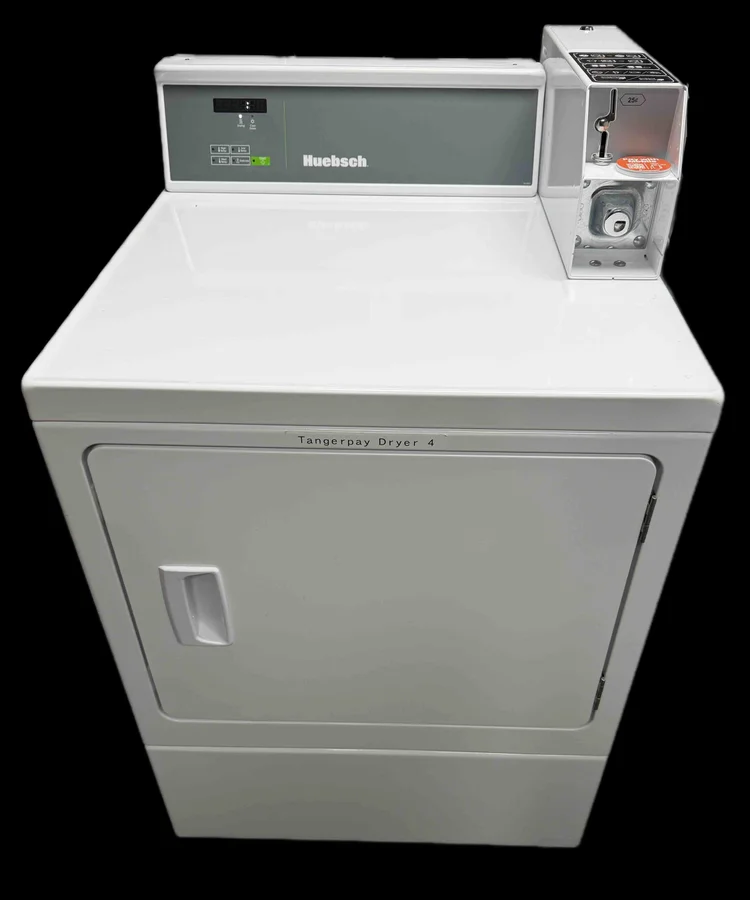
Using the Huebsch dryer with buttons at the back (HDEBCRGS176TW01)
Clean the lint trap, load, pick a heat, pay, then press START.
This page covers the white Huebsch dryers with the buttons on a gray panel along the back of the top and a metal coin box on the top at the right (model HDEBCRGS176TW01). If the buttons are on the front, or the dryer is stacked with another machine, go back to Which dryer is yours? How long the dryer runs depends on how much you pay.
1. Look first
Take 30 seconds before you load. If anything below is off, use another dryer and tell me (see If something goes wrong).
The display shows a price. It doesn't show a code such as Err, and there's no out-of-order sign.
The drum is empty. Check for things left behind.
The door closes firmly and stays shut.
Nothing smells like burning.
Wipe it down first if it needs it.
2. Clean the lint trap
Do this before every load, and again after.
Open the door. The lint trap is the metal screen at the bottom of the door opening.
It's built in, shaped like a shallow pocket. Don't try to pull it out.
Run your fingers along the screen to lift the lint out. Lift it up and away. Don't push it down through the screen.
Throw the lint in the trash.
A clean lint trap dries your clothes faster and keeps the dryer safe.
3. Load
Empty pockets: lighters, matches, pens, coins and tissues.
Fill the drum about half full. Clothes need room to tumble.
One dryer sheet is enough. Two is the limit. More than two is not allowed: it means extra cleaning of the dryer and its ducts.
Close the door firmly.
Keep out of the dryer: rubber-backed rugs and mats, foam pillows, plastic, and anything with oil, gasoline or chemicals on it, even after washing. Hang those to dry. They can catch fire.
4. Pick a heat
Press one of the four heat buttons. Its small light comes on.
High Temp: Towels, jeans, sheets and heavy cottons.
Med Temp: Everyday loads.
Low Temp: Permanent press, synthetics and blends.
Delicate: Light or heat-sensitive things.
Not sure? Check the care label inside the garment. Every setting uses heat.
5. Pay
Pay with quarters or the payment app posted in your laundry room. What's accepted varies by building. Step by step: Pay with quarters · Pay with PayRange.
Quarters go in the slot on the metal coin box, top right.
The display counts down as you pay. With an app, it counts down fast.
When it's paid, the light on the green START button flashes and the dryer beeps.
6. Press START
Make sure the door is closed. The dryer will not run with it open.
Press the green START button, at the right end of the bottom row.
You should see the Drying light come on and the minutes count down.
7. While it dries
Need more time? Add quarters before the Cool Down light comes on. Each quarter adds minutes, up to 99 minutes in all.
Opening the door stops the dryer. Close the door and press START to keep going.
Want a different heat? Press another heat button. It costs nothing more.
Near the end, the Cool Down light comes on. The dryer tumbles without heat for the last few minutes, so your clothes are safe to handle.
Let the cool-down finish. If you must stop early, take everything out at once and spread it out to cool.
8. When it's done
The display shows 00. Don't wait for a beep.
Take your clothes out right away.
Clean the lint trap again.
Check the drum for anything left behind.
The dryer is yours only for the time you paid for. Laundry left after it ends may be moved by the next person (see Other people's laundry on the Policies page). See also Pick up on time.
What the display means
The price: Ready. Load, pick a heat, pay.
A smaller amount: Partly paid. Your credit stays. Pay the rest.
START light flashing, beeping: Paid. Close the door and press START.
Minutes counting down: Drying. The Drying or Cool Down light shows which part. Come back before it reaches 00.
00: Done. Unload now.
Err: A coin or payment problem. Don't add more money. Tell me.
Anything else, such as E with letters, ALArn or oFF: A fault. Don't use the dryer. Tell me, with a photo of the display.
Clothes still damp?
Clean the lint trap and dry again.
Don't overfill. Split a big load in two.
Dry heavy things, like towels and jeans, apart from light things.
Add time while the Drying light is on.
If loads take longer than usual to dry, text or email me, or tell building maintenance. The vent may be blocked.
If something goes wrong
Stop using the dryer and tell me. Don't open panels, unplug it or try a repair.
Drum stopped but minutes still show? Close the door firmly and press START. If it stops again, tell me.
Power went out? When it comes back, press START to finish your time.
More help: The machine took my money · Clothes still wet.
To reach me, text the number posted in your laundry room, email info@stuffthatspins.net, or use the contact form. Send your full name and unit, the laundry room and machine, the date and time, what happened, and a photo of the display. I reply within 1 to 3 business days.
Refunds: if the dryer fails and it wasn't something you did, I'll refund you. Ask within 7 days. Details are on the Policies page.
Emergencies: smoke or sparks. Get clear and tell building staff or someone nearby right away. For fire or injury, call 911. Then let me know.
Machine facts
Brand and model: Huebsch HDEBCRGS176TW01, a commercial electric dryer made by Alliance Laundry Systems.
What it looks like: white, with a door on the front that swings open to the side. The display and buttons sit on a gray panel along the back of the top. A metal coin box with a quarter slot sits on the top at the right.
Payment: a quarter slot. Some laundry rooms add a PayRange or Tangerpay reader; the sign in the laundry room says which.
Heat settings: High Temp, Med Temp, Low Temp and Delicate. Every setting uses heat and ends with a cool-down.
Time: set by how much you pay. Extra quarters add minutes, up to 99 minutes.
Door: doesn't lock. Opening it stops the dryer; close it and press START to carry on.
Lint trap: a fixed metal screen, shaped like a pocket, at the bottom of the door opening. Clean it before and after every load.
Display: a price means ready; minutes counting down means drying; 00 means done; Err means a coin or payment problem; E codes, ALArn or oFF mean a fault. For any code, stop and tell Harlan, with a photo of the display.
Covers model HDEBCRGS176TW01. Last updated November 21, 2026.